<img height="1" width="1" style="display:none" src="https://www.facebook.com/tr?id=1229673850378097&amp;ev=PageView&amp;noscript=1">

    Enter your search terms and hit ENTER or use ESC to exit

    Switcher Updates

    What's fresh from Switcher?
    Check out our latest app updates and software release announcements.

    TikTok Bans AI Voices from Shopping Livestreams: What It Means for Creators

    TL;DR:

    • TikTok has updated its TikTok Shop policy to ban AI-generated voices, pre-recorded audio, and radio narration from shopping livestreams.

    • All verbal communication must be real-time and live, or sellers risk commission restrictions, content removal, and account bans.

    What did TikTok just ban?

    TikTok Shop updated its Requirements for High-Quality Videos and LIVEs policy in its US Academy to include a hard prohibition on AI-generated audio during promotional livestreams.

    TikTok Requirements

    Under the "Prohibited Content" section for livestreams, the policy now states:

    "Don't use non-real-time verbal interaction such as AI-generated voices, audio recordings, or radio."


    Sellers and creators are required to "engage directly with your viewers using real-time verbal or sign language communication and demeanor that is appropriate for all users."

    Any livestream that relies on AI-generated voices or pre-recorded narration instead of real-time interaction is listed explicitly as non-compliant content.

    The same policy update also bans:

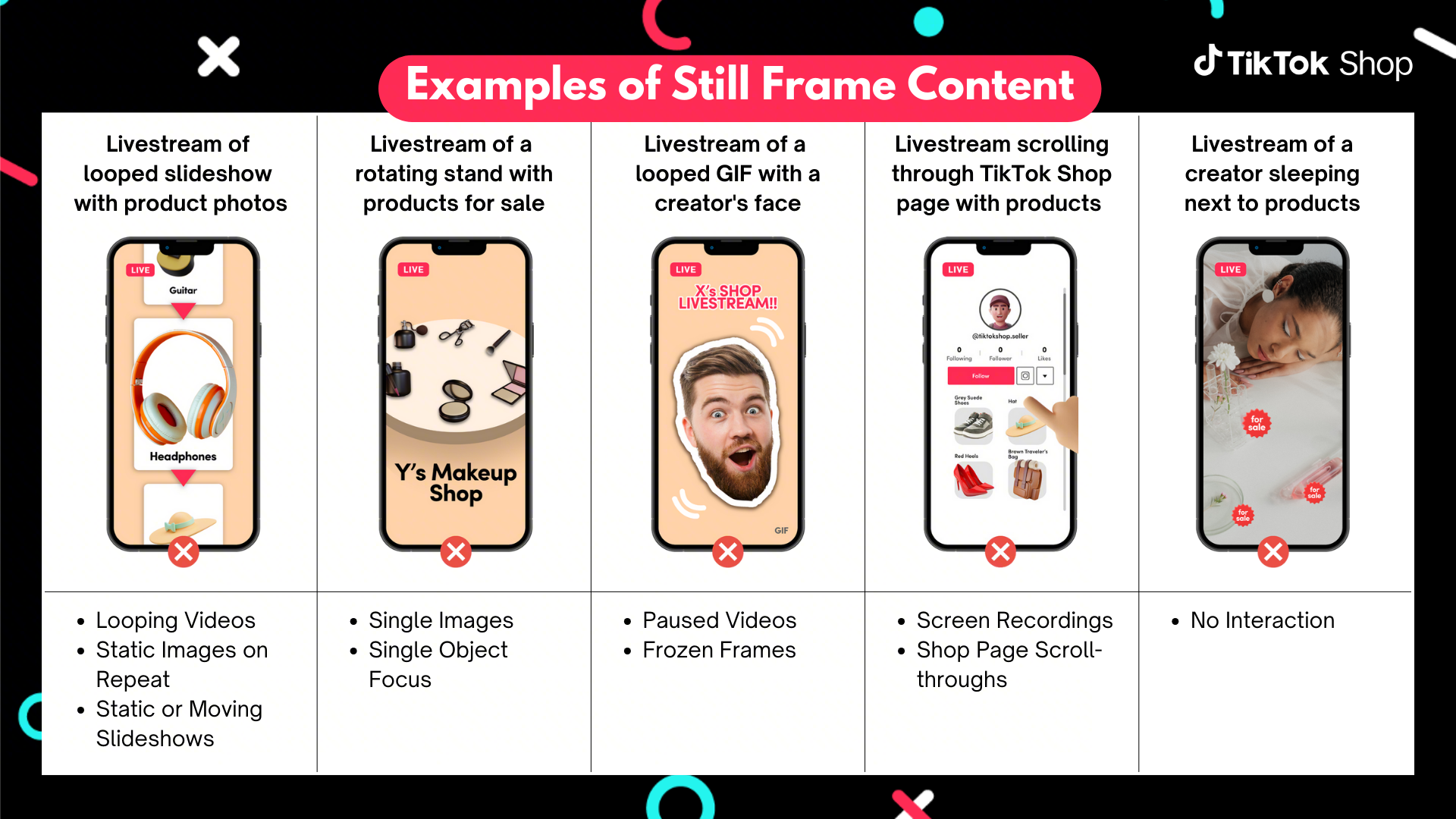
    • Still images, slideshows, or scrolling images covering more than 50% of the screen

    • Animated figures or virtual characters covering more than 50% of the screen

    • Overlaid product display page (PDP) screenshots during livestreams

    TikTok Bans Still Frame Content in Live Shopping Streams

    For recorded shoppable videos, content must:

    • Include at least three seconds of dynamic visuals without still images or loops

    • Feature the creator's face alongside the physical product

    • Be shot in a real-world environment with camera movement


    What are the enforcement consequences?

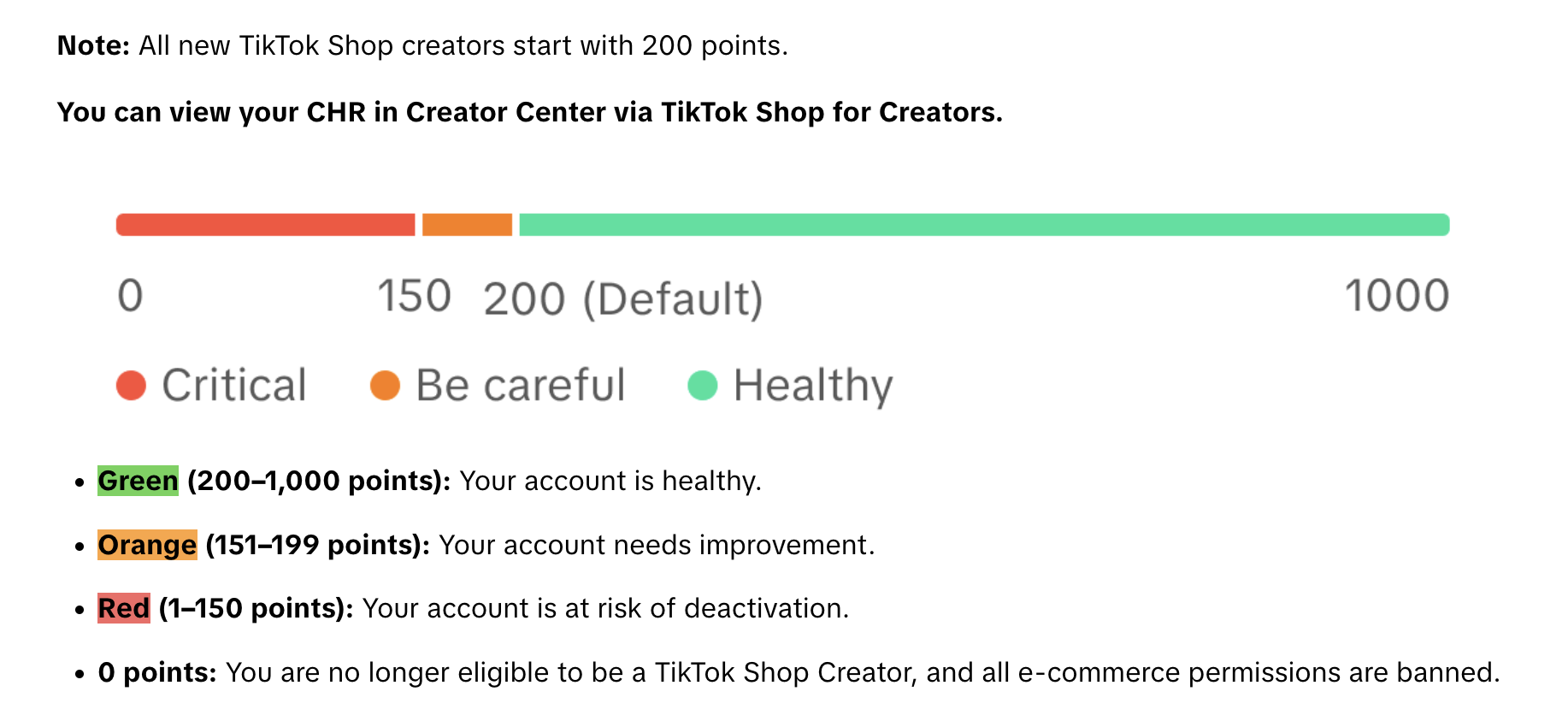
    This isn't a soft guideline — TikTok is enforcing it through its Creator Health Rating (CHR) system.

    TikTok Creator Health Rating (CHR)

    Violations can result in:

    • Assigned violation points

    • Content removal

    • Restricted access to features

    • Commission earning restrictions

    • Restricted or removed creator accounts

    Sellers can view their CHR status directly in TikTok Shop and appeal enforcement actions through the Creator Enforcement Policy.

    Why is TikTok doing this?

    TikTok Shop is projected to reach $23.4 billion in U.S. eCommerce sales in 2026 — a 48% increase year over year, placing it ahead of Target, Costco, and Best Buy by U.S. eCommerce volume.

    With that scale comes a quality problem.

    The probable driver is audience fatigue with low-effort, automated streams. When brands and sellers loop AI-generated narration over product images all day, viewers tune out — and don't come back.

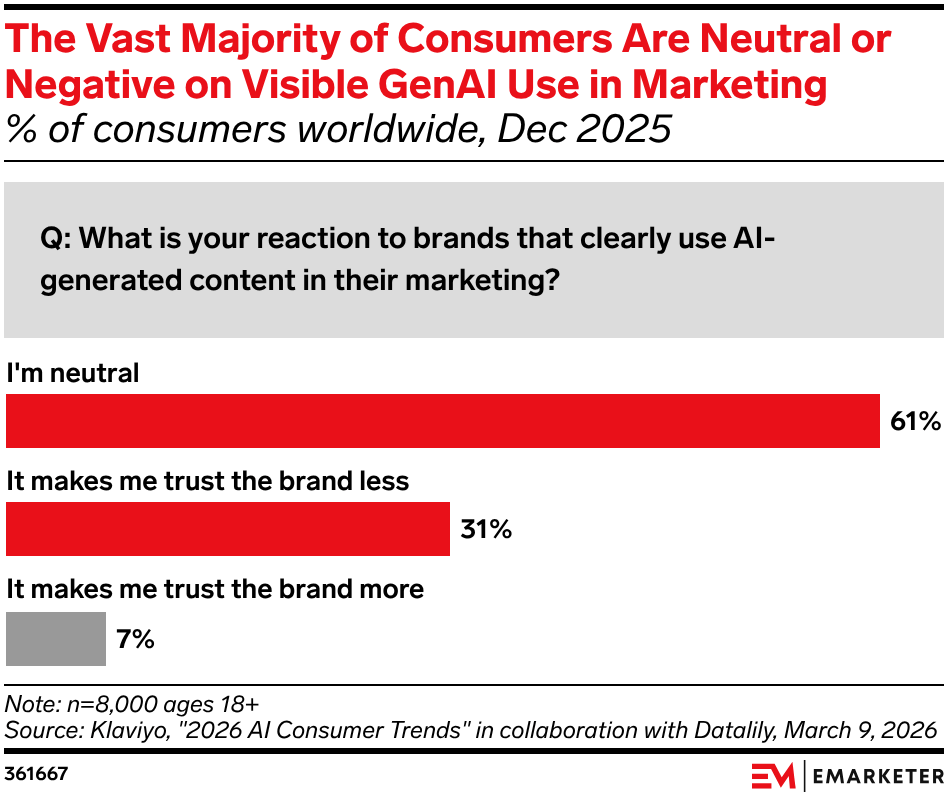
    When consumers notice AI-generated content in brand marketing, they're 31% more likely to trust a brand less.


    Klaviyo Data

    TikTok livestreams drove 84% year-over-year sales growth for participating brands during Black Friday and Cyber Monday 2025. The quality of those sessions is now a direct commercial variable, and TikTok's rules make clear who bears responsibility for maintaining it.

    What AI tools are still allowed on TikTok Shop?

    AI tools remain permitted when used in compliance with TikTok's broader AI content rules, including accuracy, transparency, disclosure where required, and avoiding misleading product claims.

    The ban applies specifically to AI standing in for real-time interaction during a live session, not to AI used before the camera goes on.

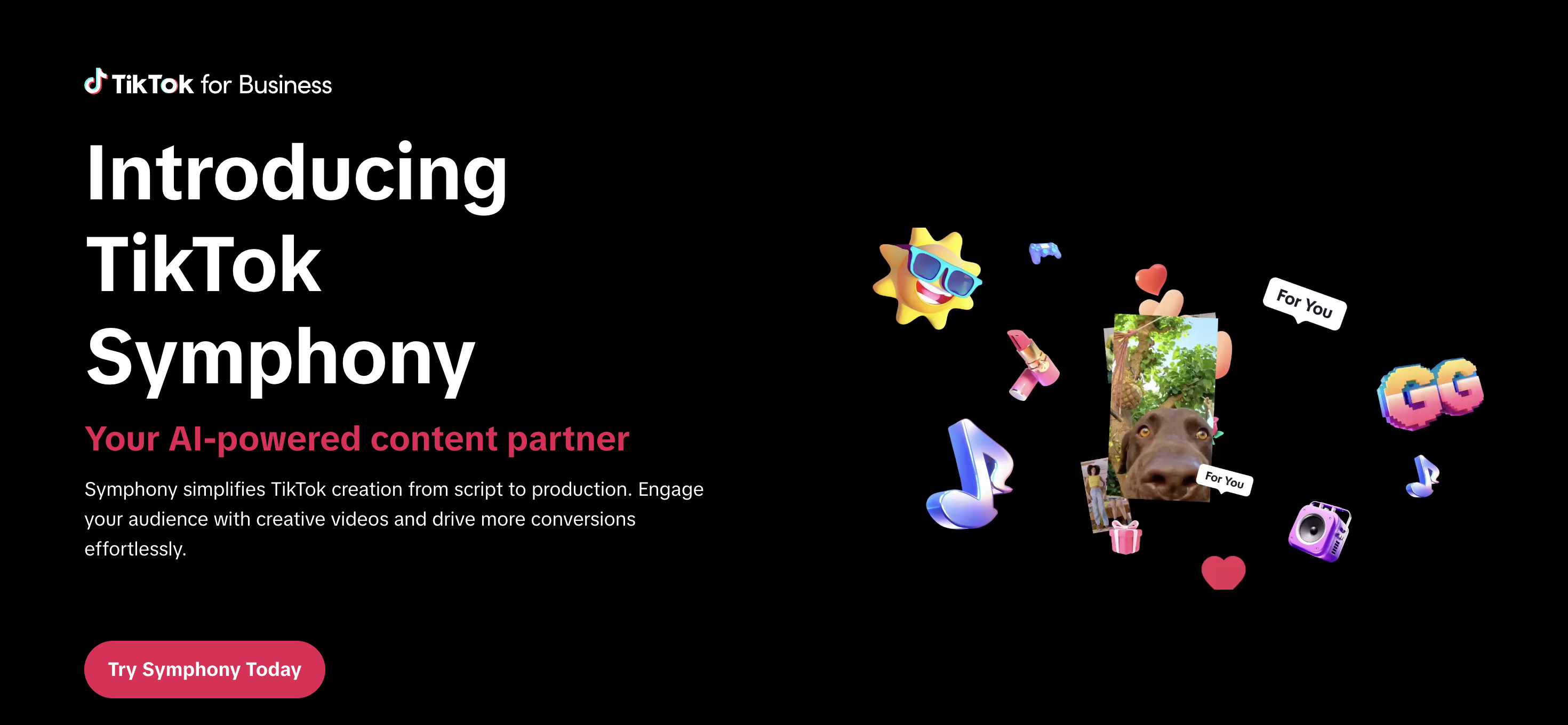
    TikTok's Symphony suite, which includes Dreamina Seedance 2.0 (ByteDance's next-generation AI video model), is still available for scripting, editing, and generating creative assets ahead of a stream.

    TikTok Symphony

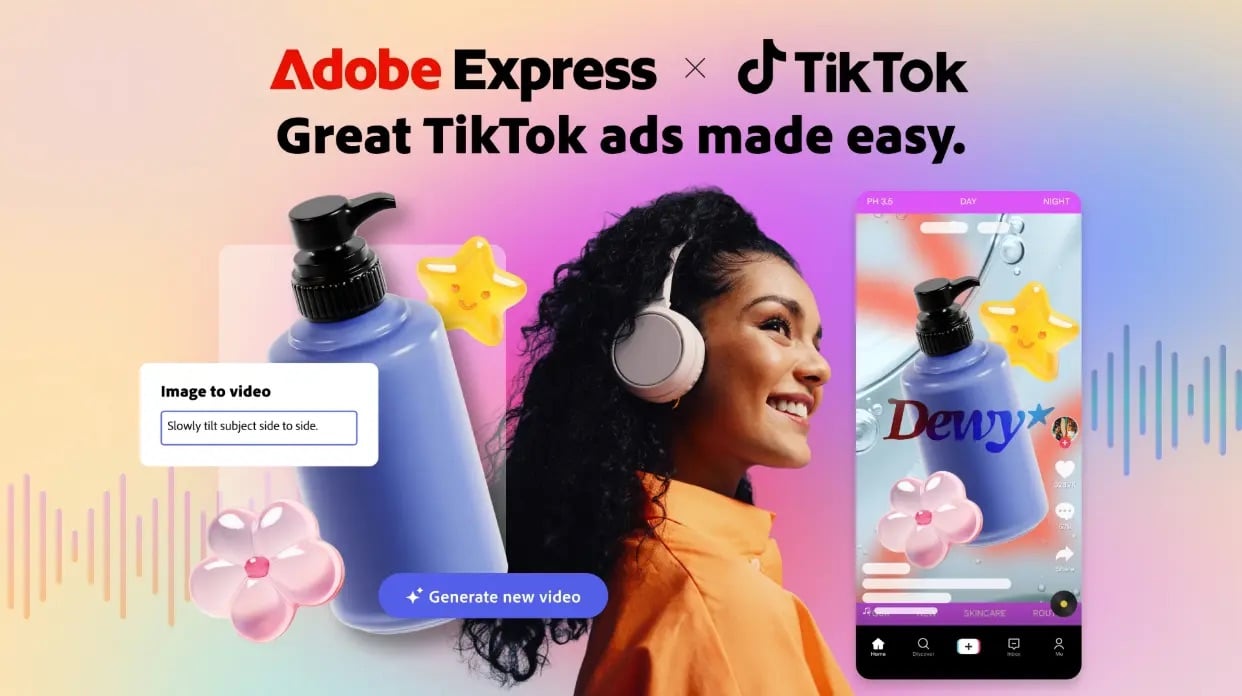
    TikTok also expanded Symphony through a partnership with Adobe, bringing AI video generation into Adobe Express.

    Adobe and TikTok Partner

    The distinction TikTok is drawing is structural: AI can help prepare the stream. It can't replace the real-time interaction inside it.

    This also runs counter to parts of the broader Chinese live commerce market, where virtual hosts and AI-assisted livestreaming have become a major production model. TikTok's US policy is moving in the opposite direction, at least for now.

    What does this mean for streamers?

    If you're running TikTok Shop livestreams, the practical implications are immediate:

    • Text-to-speech narration, looped audio tracks, and AI-generated hosts are all prohibited.

    • Real-time verbal or sign language communication is now required, not optional.

    The policy also sets affirmative production standards:

    • Adequate lighting

    • Stabilized footage

    • Clear synchronized audio

    • On-screen text that matches spoken dialogue

    Static or low-effort streams aren't just discouraged anymore — they're enforceable violations.

    This is a meaningful operational change for small sellers. Many low-budget TikTok Shop workflows rely on automated audio and still-image setups precisely because they're cheap and require no live presence. Those workflows are now barred from promotional content.

    The bigger picture, though, is that this is a level-playing-field shift.

    Creators who were already running live, high-quality, host-driven shopping streams now have a structural advantage over automated competitors. Real presence and real-time engagement are exactly what the platform is optimizing for.

    Where to go from here

    If your TikTok Shop streams are already host-led and live, you're ahead of the policy. But it's worth running a quick audit against the affirmative production standards TikTok also codified in the same update.

    Check that:

    • Your lighting clearly shows the product
    • Your audio is clean and synced to any on-screen text
    • Your camera is stabilized
      You're showing the physical product from multiple angles during demos.

    These aren’t just best practices, they're now enforceable requirements.

    If your workflow has leaned on automated audio or static visuals, the transition window is now. The Creator Health Rating system is active, violations accumulate points, and the consequences — commission restrictions, content removal, account bans — are real and compounding.

    Getting flagged once doesn't just hurt the stream it's applied to; it affects your overall account health score, which governs access to features across TikTok Shop.

    Review TikTok's official Requirements for High-Quality Videos and LIVEs directly to see the full policy language. The enforcement section and Creator Health Rating explainer are both linked from that page.


    YouTube FIFA Creator Cup 2026: What Every Streamer Needs to Know

    TL;DR:

    • YouTube is FIFA's Preferred Platform Partner for the 2026 World Cup

    • On July 12, the platform will host the first-ever YouTube FIFA Creator Cup — a live exhibition match with creators, athletes, and celebrities, streaming globally July 12 from NYC.

    • The FIFA World Cup 2026 kicks off June 11 and runs through July 19.

    • For streamers and creators, this isn't just a sporting event — it's the clearest signal yet about where YouTube Live is heading.


    What is the YouTube FIFA Creator Cup?

    On July 12, YouTube and FIFA will host the first-ever YouTube FIFA Creator Cup, live streaming globally and exclusively on YouTube from New York City.

    The match will bring together YouTube creators, elite athletes, and celebrities in what YouTube describes as an exhibition matchup. Full team captains and player rosters are still to be announced ahead of the event.

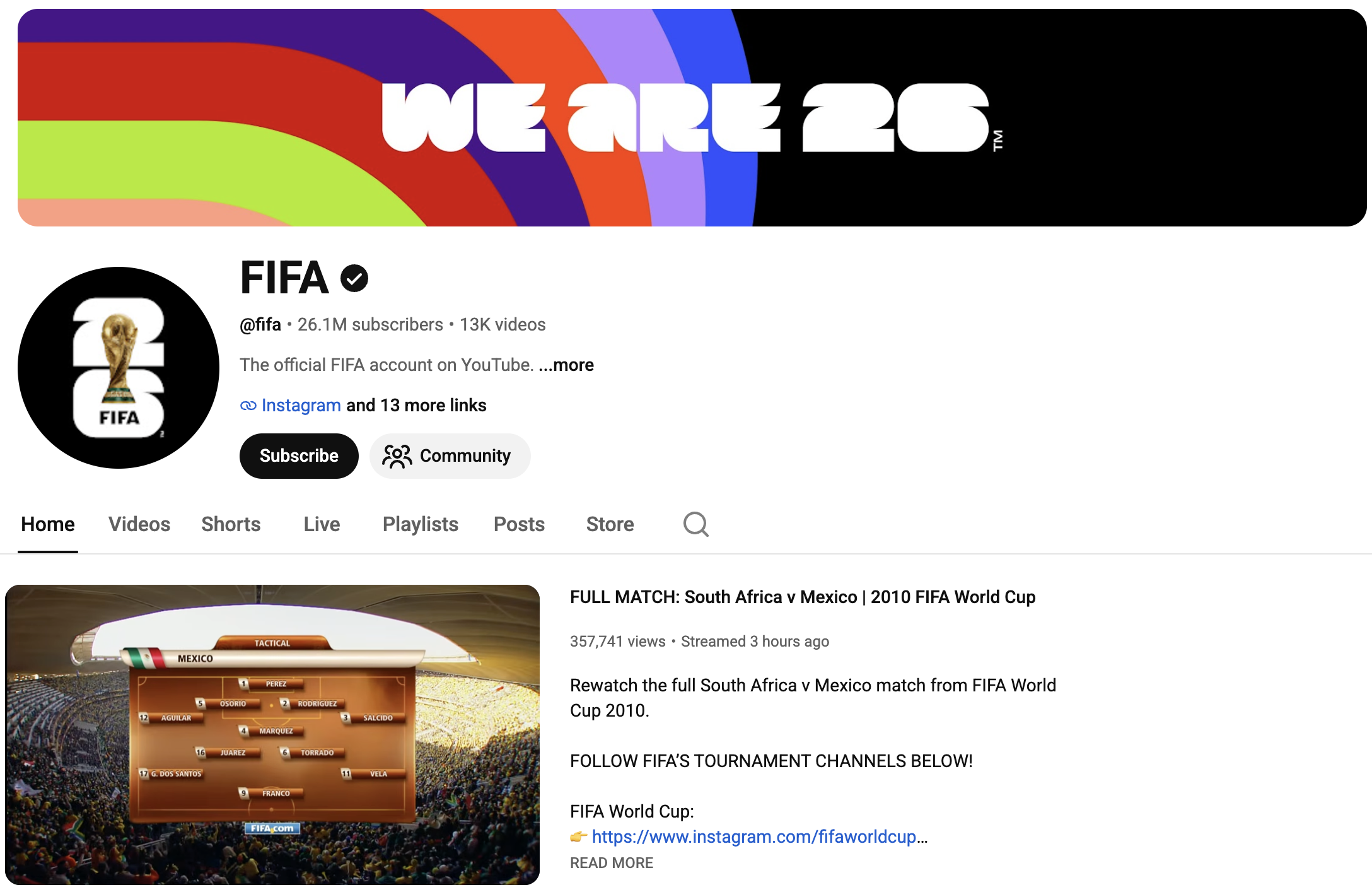
    FIFA's Official YouTube Channel

    The Creator Cup is part of a Preferred Platform Partnership between YouTube and FIFA announced in March 2026.

    That deal made YouTube the primary digital destination for World Cup content — not a secondary highlight reel, but a primary broadcast layer running alongside traditional media partners.

    “This collaboration with YouTube reinforces our ambition to maximise the tournament’s impact across the ever-evolving media landscape.”


    - Mattias Grafström, FIFA Secretary General


    Which creators are covering the FIFA World Cup 2026 on YouTube?

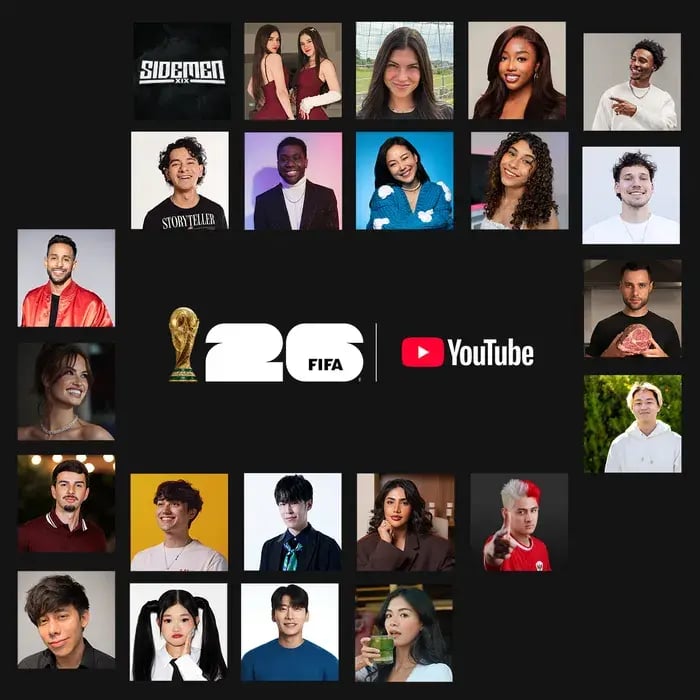
    YouTube has named 24 global creators with official tournament access and a combined subscriber count of more than 350 million.

    The full creator roster spans football-first channels and mainstream lifestyle creators from across 13+ countries:

    Creator_Image.max-700x3000.format-webp

    • United States: Deestroying, Jesser, Anwar Jibawi, Ashley Alexander, Courtreezy, Haley Kalil, Horchata Soto, Howieazy, Jenny Hoyos, Kelly Wakasa, Zhong

    • United Kingdom: The Sidemen

    • Mexico: Ara y Fer, Sonrixs

    • Brazil: Neagle, Viniblogger

    • Belgium: Celine Dept

    • Canada: Jeenie Weenie

    • Japan: TokaiOnAirRYO

    • South Korea: Kwak Yoongy

    • Kazakhstan: Kika Kim

    • Indonesia: KYLECTRIX

    • UAE: Noor Stars

    Their coverage will span match-day experiences, local food culture, behind-the-scenes stadium access, tactical breakdowns, and cultural storytelling across the three host nations: the United States, Canada, and Mexico.


    How will FIFA World Cup 2026 matches stream on YouTube?

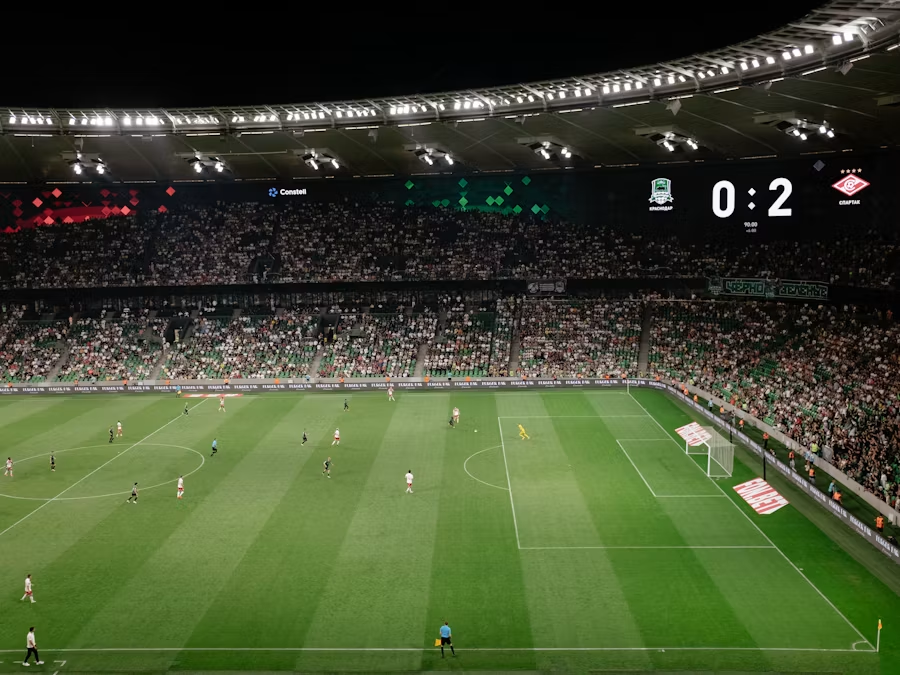
    For the first time in World Cup history, official media partners have the option to live stream the first 10 minutes of every match on their YouTube channels. Some partners will also stream select full matches from start to finish.

    Regional breakdown:

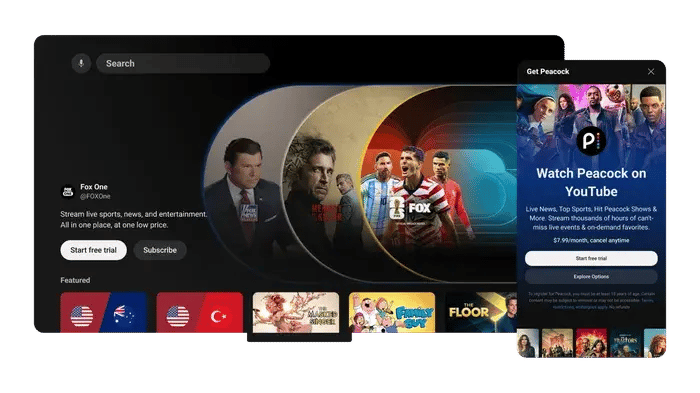
    • U.S.: YouTube TV carries all 104 matches via Fox, FS1, Telemundo, and Universo. Subscribers to FOX One through YouTube's Primetime Channels also get all 104 matches directly on YouTube, with multiview and key plays features.

    YouTube-primetime-channels-expansion-f.max-700x3000.format-webp

    • Brazil: CazéTV is streaming all matches live and free on YouTube.
    • Portugal: LiveModeTV streams one match per day on YouTube, including all games featuring the Portuguese national team.

    Beyond live coverage, official broadcasters have access to extended highlights, behind-the-scenes footage, Shorts, and video-on-demand content they can publish to their channels throughout the tournament.


    What does this mean for streamers?

    The World Cup being on YouTube is a platform-level opportunity, and it's happening right now.

    The Creator Cup sets a new template for live events

    A FIFA-sanctioned, globally live-streamed exhibition match featuring YouTube creators is a new category. It's not a brand activation — it's a live broadcast with official standing.

    For creators in the sports entertainment space, this raises the ceiling for what "creator live event" can mean.

    Official access changes the status of creator content

    These 24 creators aren't shooting fan footage from the stands. They have press-tier access to stadiums, sidelines, and behind-the-scenes moments that previously required broadcast credentials.

    YouTube is actively positioning its top creators as a legitimate media tier alongside traditional broadcasters.

    The first-10-minutes rule creates a live audience habit

    Every World Cup match will have an audience on YouTube for the opening whistle. That's new viewer behavior being built in real time.

    Creators running watch parties, live commentary, or reaction content during the tournament are building into that habit formation, not fighting against it.

    Live Football Match

    Shorts effects give smaller creators a platform push

    YouTube has released four official FIFA World Cup 2026 Shorts effects — a face paint filter, a Star Shooter game, an official FIFA photobooth, and a 20-second countdown challenge — all available directly in the Shorts camera via FIFA's YouTube channel.

    These aren't cosmetic. YouTube promoting its own World Cup effects is a distribution accelerant for any creator using them.

    The upshot?

    The tournament runs through July 19. The Creator Cup is July 12.

    There are six weeks of the biggest live sports moment on YouTube, and the platform has built infrastructure specifically designed to surface creator content.

    Planning now isn't optional — it's the difference between riding the wave and watching it.

    Meta Quietly Launches New "Forum" App: Here's What You Need to Know

    TL;DR:

    • Meta quietly released a standalone iOS app called Forum that gives Facebook Groups a dedicated space outside the main Facebook feed.
    • It’s currently available in the US only and includes AI features for answering questions, personalizing feeds, and helping admins moderate communities.
    • For streamers, Forum could make Facebook Groups more useful for keeping audiences connected between live streams.


    Meta quietly released a new app called Forum on May 22, 2026. There was no press release, no major announcement, and no public launch campaign.

    The app was spotted in the Apple App Store by social media researcher Matt Navarra. It’s built around Facebook Groups and gives users a separate place to follow Group activity outside the main Facebook app.
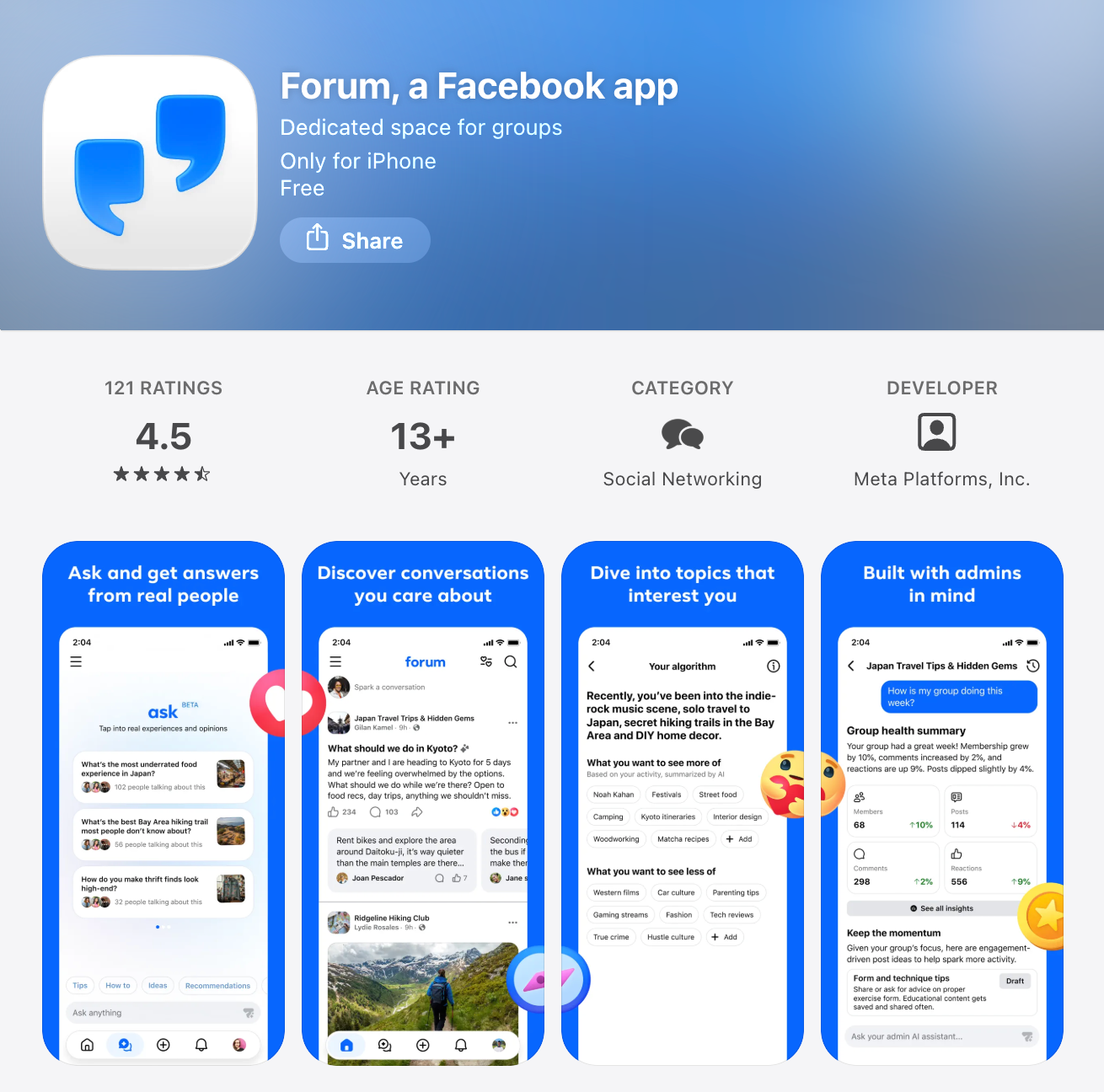
    Forum: Facebook's New Group App

    For streamers, this is worth watching.

    Many live streamers already use Facebook Groups to support their content. Groups can help you keep viewers informed, answer follow-up questions, share replays, build anticipation for upcoming streams, and give your audience a place to interact when you are not live.

    But Groups have a visibility problem.

    Inside the main Facebook app, Group posts sit alongside friends’ updates, Pages, ads, Reels, recommendations, and whatever else Facebook decides to show. That makes it easy for community updates to get missed.

    Forum appears to address that problem directly.

    Instead of making Groups one part of Facebook, Forum gives Groups their own app experience.

    What is Meta’s Forum app?

    Forum is a standalone iOS app for Facebook Groups.

    The app gives users a dedicated feed for Group conversations, separate from the main Facebook feed. Instead of opening Facebook and seeing a mix of friends’ posts, Pages, ads, Reels, and recommended content, Forum focuses on activity from Groups.
    Facebook's Forum App Logo

    The App Store listing describes Forum as “a dedicated space for the conversations that matter most to you.”

    Forum is currently available only in the United States and requires iOS 18.0 or later. It is already on version 1.1, which suggests Meta has shipped at least one update since the initial release.

    Meta has described Forum as a test, not a full public launch. When Engadget asked about the app, a Meta spokesperson said: “We test lots of new products publicly to see what people find interesting and useful to their experiences across our apps.”

    How does Forum work?

    Forum connects to your existing Facebook account.

    When you log in, your Facebook profile and Groups carry over automatically. Posts made in Forum also appear on Facebook, and posts made in Facebook Groups can appear in Forum. The two apps stay connected.

    That makes Forum different from starting a new community platform from scratch. If you already have a Facebook Group, Forum gives that same Group another place to be seen.

    The app also asks users what topics they want to see more of during onboarding. That suggests Forum may recommend conversations or Groups based on user interests, although the core experience is still built around Groups.

    How is Forum different from the main Facebook app?

    The biggest difference is focus. The main Facebook app combines many types of content in one feed. Your audience may follow your Group, but they still have to find your posts in the middle of everything else Facebook shows them.

    Forum narrows the experience.

    It removes much of the surrounding feed noise and puts Group activity at the center. For people who use Facebook mainly for Groups, that could make the app feel more useful and less distracting.

    For streamers, the practical value is simple: if your audience already uses a Facebook Group to keep up with you, Forum may make that Group easier to check and easier to follow.
    Facebook's Suite of Different Apps

    Who can use Forum?

    Forum is currently available for iOS users in the United States.

    Users need a Facebook account to log in. Existing Facebook profile information and Group memberships carry over into the app.

    There is no public timeline yet for Android availability or international rollout.

    Is Forum anonymous?

    Forum is not fully anonymous.

    Users can post with nicknames in Facebook Groups if that feature is enabled. Meta introduced Group usernames in November 2025. However, Group admins can still see members’ real identities.

    That means Forum is pseudonymous, not anonymous.

    For streamers and community managers, this distinction matters. Nicknames may make some members feel more comfortable participating, but the app still operates within Facebook’s identity and admin system.

    What AI features does Forum include?

    Forum includes three main AI features:

    AI feature #1. Ask

    Ask lets users ask a question across their Groups instead of searching through each Group manually.

    According to the App Store listing, Ask can pull together responses from across Groups so users can find answers faster and join relevant conversations.
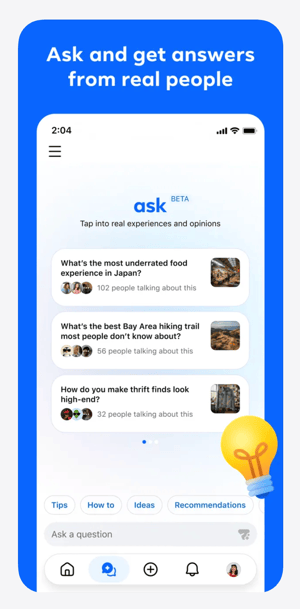
    Forum's AI Feature #1: Ask

    For streaming communities, this could be useful if your Group includes recurring questions, technical discussions, tutorials, product recommendations, or event information.

    AI feature #2. AI admin assistant

    Forum also includes an AI admin assistant for Group moderators.

    The App Store listing says the assistant can help admins manage their Groups, moderate content, and keep communities healthy while admins remain in control.

    For streamers, this may be the most important AI feature.

    A Facebook Group can become harder to manage as your audience grows. You may need to approve members, remove spam, answer repeated questions, respond to comments, and keep discussions organized. If AI can help with some of that routine work, it could reduce the time required to maintain an active Group.
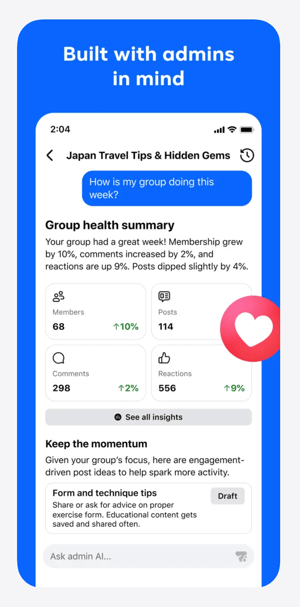
    Forum's AI Feature #2. AI Admin Assistant

    That does not replace real community management. But it may make Group management more realistic for solo streamers, small teams, and organizations with limited staff.

    AI feature #3. AI Personalization

    Forum also includes a personalization layer that shapes what users see based on their interests.

    This appears to connect to the onboarding experience, where users are asked what topics they want to see more of. Over time, this could influence which Group conversations appear most prominently in the app.
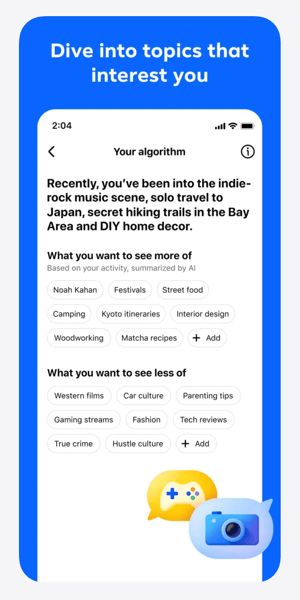
    Forum's AI Feature #3. AI Personalization

    For streamers, this raises an important question: will Forum simply make existing Groups easier to access, or will it also become a discovery surface for new communities?

    That part is still unclear.

    What about privacy?

    Forum’s App Store listing discloses extensive data collection linked to users’ identities. This includes location, browsing history, contacts, usage data, and purchases.

    That is consistent with Facebook’s broader data practices, but it is still worth noting.

    If your audience is privacy-conscious, you may not want to position Forum as a neutral or lightweight community app. It is still a Meta product, connected to Facebook accounts and Facebook data systems.

    Why Forum matters for streamers

    Forum matters because it could change how useful Facebook Groups are for live streaming communities.

    Facebook Groups already have clear advantages for streamers:

    • Many viewers already have Facebook accounts

    • Groups are familiar to many audiences

    • You can share replays, links, updates, and resources

    • Members can ask questions before and after streams

    • Group conversations can support long-term audience engagement

    The weakness has always been visibility.

    If your Group posts do not appear when people are paying attention, the Group becomes less useful. You may have the right audience in the right place, but still struggle to keep discussions active.

    Forum gives Groups a more focused environment.

    That could make it easier for streamers to use Facebook Groups as part of their broader content strategy, especially if they already stream to Facebook or have an audience that spends time there.

    How streamers could use Forum

    If Forum becomes more widely available, streamers could use it to support their live content in several practical ways.

    1. Share pre-stream prompts

    Before going live, you can use your Group to ask viewers what they want covered, what questions they have, or what examples they want to see.

    This gives your stream a stronger starting point and makes viewers feel more involved before the broadcast begins.

    2. Keep discussions going after the stream

    After a live stream, your Group can become the place where viewers ask follow-up questions, share takeaways, or continue a discussion that started live.

    This is especially useful for educational streams, churches, nonprofits, live sellers, coaches, and creator-led communities.

    3. Organize replays and resources

    A Group can help you make your live content easier to revisit.

    You can post replay links, timestamps, downloads, product links, donation links, event details, or discussion threads in one place.

    4. Support recurring live shows

    If you stream on a regular schedule, your Group can help people know what is coming next.

    You can post reminders, preview topics, gather questions, and give members a reason to return for the next broadcast.

    5. Reduce admin workload

    If Forum’s AI admin assistant works well, it could help reduce some of the routine tasks that make Groups difficult to maintain.

    That may be useful for streamers who want community engagement but do not have a dedicated moderator or community manager.

    Should streamers use Forum now?

    If you are in the United States, use an iPhone, and already have a Facebook Group connected to your streaming strategy, Forum is worth testing.

    Start simple.

    Download the app, review how your Group appears, and compare the experience to the main Facebook app. Look at whether posts feel easier to find, whether conversations are easier to follow, and whether the AI features are actually useful.

    You do not need to move your whole community strategy around Forum yet.

    The app is still a test. It is limited to iOS. It is limited to the US. Meta has not said whether Forum will become a long-term product.

    But the direction is important.

    Meta appears to be giving Facebook Groups more dedicated attention. For streamers who already rely on Groups, that could make Facebook a stronger place to build and maintain audience relationships around live content.

    The bottom line

    Forum is not a replacement for your live streaming platform, your email list, or your owned audience strategy.

    But it may become a useful layer for streamers who already use Facebook Groups.

    If Forum helps audiences find Group posts more easily, helps admins manage conversations more efficiently, and makes Facebook Groups feel less buried inside the main feed, it could become a valuable tool for live streamers.

    For now, treat Forum as something to test, not something to depend on.

    If Facebook is part of your streaming strategy, download Forum, explore the feed, and see whether it makes your Group easier to use.

     

    4 Big YouTube Live Updates Every Streamer Should Know About

    YouTube is doubling down on livestreaming. From new ways to get paid to smarter ad behavior to a brand-new simulcast capability, the platform just rolled out four changes with real implications for anyone who goes live.
    Here's what's new, what each update does, and why this moment matters for you, the streamer, and for the live streaming economy.
    What's new on YouTube Live

    1. Gifts now work on horizontal streams — in more countries

    YouTube's livestream gifting — viewer-to-creator tips delivered through animated stickers — used to be locked to vertical streams. Now viewers can send gifts on horizontal livestreams too, directly from their mobile devices.

    Gifts also expanded to more streamers globally, including Canada, Korea, Indonesia, Thailand, Australia, and New Zealand, with more countries on the way.

    Horizontal is still where most "studio quality" content lives: multi-camera shows, gameplay, podcasts, sports breakdowns, church services. Bringing gifts to that format means a much wider swath of streamers can monetize live moments without rebuilding their setup for vertical.

    2. Ad-free windows for Super Chats, Super Stickers, and gifts (rolling out)

    When a viewer sends a Super Chat, Super Sticker, or gift, YouTube will automatically create a personal ad-free window for that supporter — a stretch of uninterrupted viewing as a thank-you.

    The feature is rolling out, and it only works for streamers who have automatic ads enabled.

    Small mechanic, big psychological payoff. Supporting a creator now feels like a tangible upgrade for the viewer, not just a tip jar.

    3. YouTube auto-holds ads when chat engagement spikes

    This is the most subtle update — and arguably the most important. YouTube's system now recognizes when live chat engagement hits its peak and automatically holds back ads for everyone watching. (This also requires automatic ads turned on.)

    The platform is now treating audience engagement as something worth protecting.

    For streamers who build streams around chat interaction — Q&As, reaction streams, watch-alongs, gameplay commentary — peak moments stay peak instead of getting cut off by an ad break.

    4. Simulcast vertical and horizontal with one shared chat

    Already live: streamers can now go live in both vertical and horizontal formats at the same time, with everyone joining a single shared chat.

    More customization tools are coming in the next few months, including vertical cropping layouts in Live Studio and multiple stream keys for sending separate, customized feeds to each format.

    The why: per YouTube, over 30% of U.S. live watch time came from connected TVs in 2025. Until now, streamers had to pick between vertical (mobile-first discovery) and horizontal (desktops, TVs, longer sessions). Now you don't.

    What this means for live streamers

    • More monetization surfaces: Gifts on horizontal streams open up live revenue for streamers who don't make vertical content.

    • Engagement is a competitive moat: Streams with active chat will literally see fewer ad interruptions — a soft incentive to invest in community, moderators, and chat-friendly formats.

    • Format flexibility is table stakes: With 30%+ of U.S. live watch time on connected TVs, optimizing for just one screen is no longer enough.

    • Automatic ads are now a strategic decision: Two of the four updates only work with auto-ads on. If you've been managing placements manually, it's worth re-evaluating.

    What this signals for the live streaming industry

    Live is becoming some of the most important real estate on YouTube.

    For most of the last decade, livestreaming on YouTube was treated as a feature — useful but secondary to on-demand video. These updates suggest that's changing.

    YouTube is investing in the:

    • Unit economics of live (more monetization)

    • Viewing experience of live (smarter ads)

    • Production economics of live (one stream, two formats).

    Those are the three things you fix to grow a category.

    The connected-TV stat is the tell. Live on YouTube isn't a phone-and-Shorts story anymore — it's a living-room story too. That's a different audience from Twitch (still desktop-heavy) or TikTok and Instagram Live (vertical-mobile-first), and YouTube is uniquely positioned to be all of them at once.

    For the creator economy, the major platforms are converging on a shared model: vertical and horizontal, gifts and chat tips, real-time monetization layered on top of ad revenue.

    The streamers who win the next few years will treat live as a core format rather than a one-off — with production setups flexible enough to publish in any shape, on any platform.

    The tooling is finally catching up to the ambition.

    Make the most of the new YouTube Live

    YouTube is rewarding production quality, multi-format flexibility, and active community more than ever — and that's what Switcher is built for.

    Stream multi-camera live broadcasts to YouTube (and beyond) using the devices you already have, with the production polish that earns Super Chats and the engagement that keeps viewers in chat. Start your free trial today.