
TL;DR:
- Meta quietly released a standalone iOS app called Forum that gives Facebook Groups a dedicated space outside the main Facebook feed.
- It’s currently available in the US only and includes AI features for answering questions, personalizing feeds, and helping admins moderate communities.
- For streamers, Forum could make Facebook Groups more useful for keeping audiences connected between live streams.
Meta quietly released a new app called Forum on May 22, 2026. There was no press release, no major announcement, and no public launch campaign.
The app was spotted in the Apple App Store by social media researcher Matt Navarra. It’s built around Facebook Groups and gives users a separate place to follow Group activity outside the main Facebook app.
For streamers, this is worth watching.
Many live streamers already use Facebook Groups to support their content. Groups can help you keep viewers informed, answer follow-up questions, share replays, build anticipation for upcoming streams, and give your audience a place to interact when you are not live.
But Groups have a visibility problem.
Inside the main Facebook app, Group posts sit alongside friends’ updates, Pages, ads, Reels, recommendations, and whatever else Facebook decides to show. That makes it easy for community updates to get missed.
Forum appears to address that problem directly.
Instead of making Groups one part of Facebook, Forum gives Groups their own app experience.
What is Meta’s Forum app?
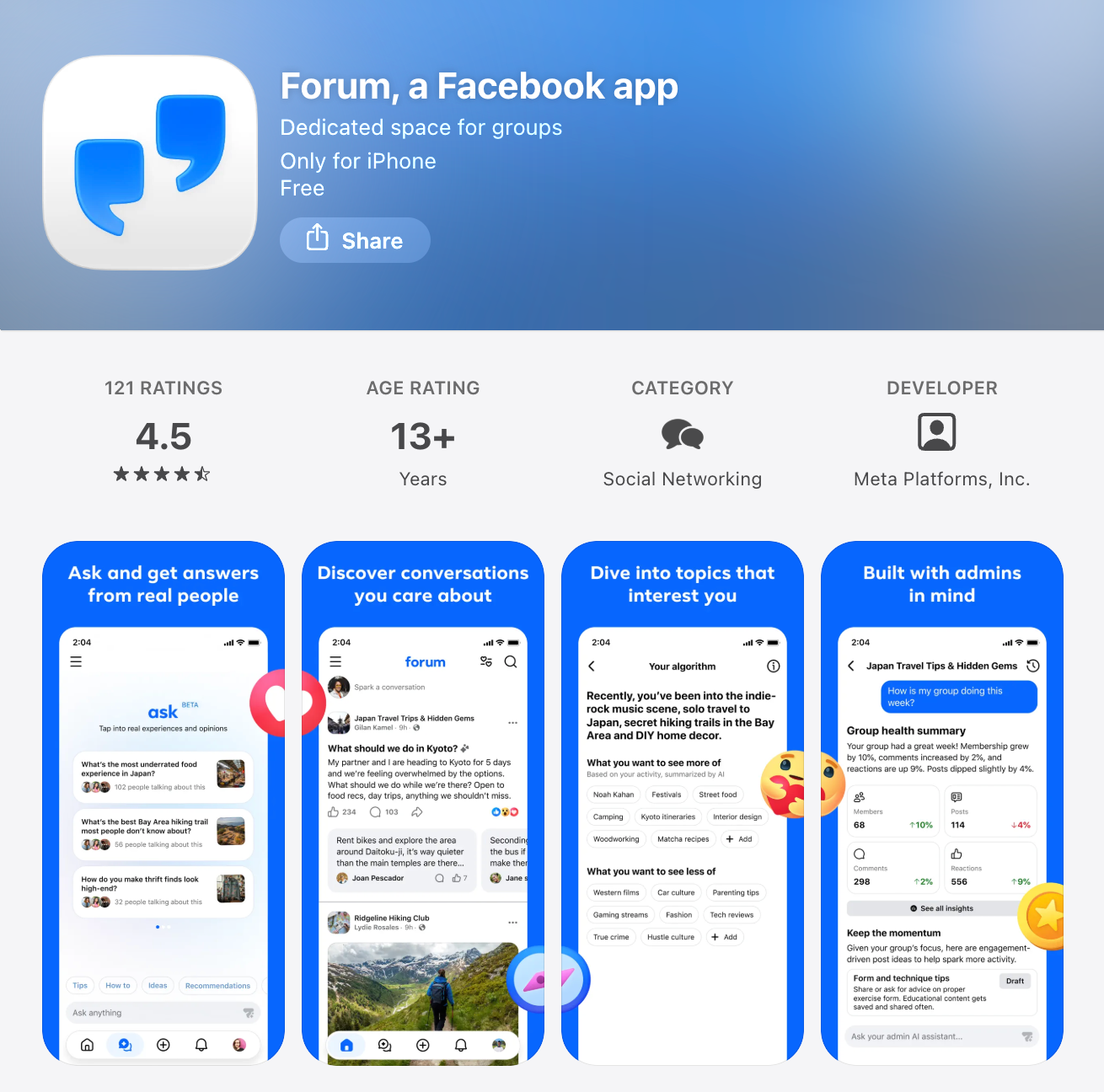
Forum is a standalone iOS app for Facebook Groups.
The app gives users a dedicated feed for Group conversations, separate from the main Facebook feed. Instead of opening Facebook and seeing a mix of friends’ posts, Pages, ads, Reels, and recommended content, Forum focuses on activity from Groups.

The App Store listing describes Forum as “a dedicated space for the conversations that matter most to you.”
Forum is currently available only in the United States and requires iOS 18.0 or later. It is already on version 1.1, which suggests Meta has shipped at least one update since the initial release.
Meta has described Forum as a test, not a full public launch. When Engadget asked about the app, a Meta spokesperson said: “We test lots of new products publicly to see what people find interesting and useful to their experiences across our apps.”
How does Forum work?
Forum connects to your existing Facebook account.
When you log in, your Facebook profile and Groups carry over automatically. Posts made in Forum also appear on Facebook, and posts made in Facebook Groups can appear in Forum. The two apps stay connected.
That makes Forum different from starting a new community platform from scratch. If you already have a Facebook Group, Forum gives that same Group another place to be seen.
The app also asks users what topics they want to see more of during onboarding. That suggests Forum may recommend conversations or Groups based on user interests, although the core experience is still built around Groups.
How is Forum different from the main Facebook app?
The biggest difference is focus. The main Facebook app combines many types of content in one feed. Your audience may follow your Group, but they still have to find your posts in the middle of everything else Facebook shows them.
Forum narrows the experience.
It removes much of the surrounding feed noise and puts Group activity at the center. For people who use Facebook mainly for Groups, that could make the app feel more useful and less distracting.
For streamers, the practical value is simple: if your audience already uses a Facebook Group to keep up with you, Forum may make that Group easier to check and easier to follow.
Who can use Forum?
Forum is currently available for iOS users in the United States.
Users need a Facebook account to log in. Existing Facebook profile information and Group memberships carry over into the app.
There is no public timeline yet for Android availability or international rollout.
Is Forum anonymous?
Forum is not fully anonymous.
Users can post with nicknames in Facebook Groups if that feature is enabled. Meta introduced Group usernames in November 2025. However, Group admins can still see members’ real identities.
That means Forum is pseudonymous, not anonymous.
For streamers and community managers, this distinction matters. Nicknames may make some members feel more comfortable participating, but the app still operates within Facebook’s identity and admin system.
What AI features does Forum include?
Forum includes three main AI features:
AI feature #1. Ask
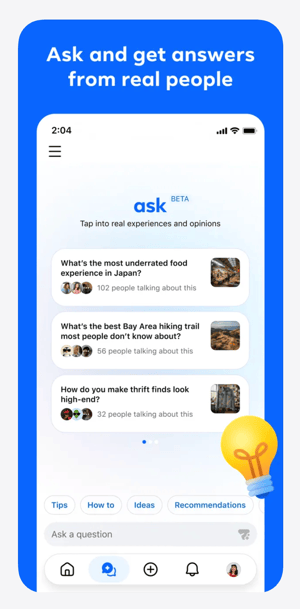
Ask lets users ask a question across their Groups instead of searching through each Group manually.
According to the App Store listing, Ask can pull together responses from across Groups so users can find answers faster and join relevant conversations.
For streaming communities, this could be useful if your Group includes recurring questions, technical discussions, tutorials, product recommendations, or event information.
AI feature #2. AI admin assistant
Forum also includes an AI admin assistant for Group moderators.
The App Store listing says the assistant can help admins manage their Groups, moderate content, and keep communities healthy while admins remain in control.
For streamers, this may be the most important AI feature.
A Facebook Group can become harder to manage as your audience grows. You may need to approve members, remove spam, answer repeated questions, respond to comments, and keep discussions organized. If AI can help with some of that routine work, it could reduce the time required to maintain an active Group.
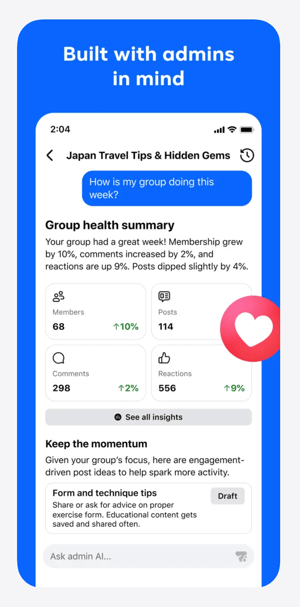
That does not replace real community management. But it may make Group management more realistic for solo streamers, small teams, and organizations with limited staff.
AI feature #3. AI Personalization
Forum also includes a personalization layer that shapes what users see based on their interests.
This appears to connect to the onboarding experience, where users are asked what topics they want to see more of. Over time, this could influence which Group conversations appear most prominently in the app.
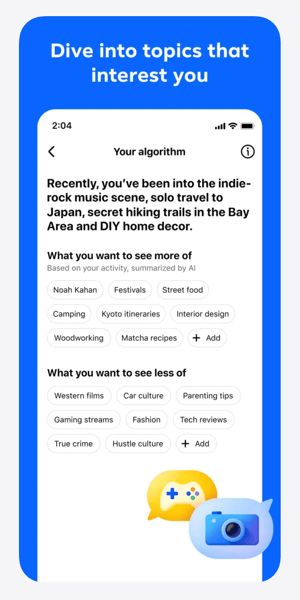
For streamers, this raises an important question: will Forum simply make existing Groups easier to access, or will it also become a discovery surface for new communities?
That part is still unclear.
What about privacy?
Forum’s App Store listing discloses extensive data collection linked to users’ identities. This includes location, browsing history, contacts, usage data, and purchases.
That is consistent with Facebook’s broader data practices, but it is still worth noting.
If your audience is privacy-conscious, you may not want to position Forum as a neutral or lightweight community app. It is still a Meta product, connected to Facebook accounts and Facebook data systems.
Why Forum matters for streamers
Forum matters because it could change how useful Facebook Groups are for live streaming communities.
Facebook Groups already have clear advantages for streamers:
-
Many viewers already have Facebook accounts
-
Groups are familiar to many audiences
-
You can share replays, links, updates, and resources
-
Members can ask questions before and after streams
-
Group conversations can support long-term audience engagement
The weakness has always been visibility.
If your Group posts do not appear when people are paying attention, the Group becomes less useful. You may have the right audience in the right place, but still struggle to keep discussions active.
Forum gives Groups a more focused environment.
That could make it easier for streamers to use Facebook Groups as part of their broader content strategy, especially if they already stream to Facebook or have an audience that spends time there.
How streamers could use Forum
If Forum becomes more widely available, streamers could use it to support their live content in several practical ways.
1. Share pre-stream prompts
Before going live, you can use your Group to ask viewers what they want covered, what questions they have, or what examples they want to see.
This gives your stream a stronger starting point and makes viewers feel more involved before the broadcast begins.
2. Keep discussions going after the stream
After a live stream, your Group can become the place where viewers ask follow-up questions, share takeaways, or continue a discussion that started live.
This is especially useful for educational streams, churches, nonprofits, live sellers, coaches, and creator-led communities.
3. Organize replays and resources
A Group can help you make your live content easier to revisit.
You can post replay links, timestamps, downloads, product links, donation links, event details, or discussion threads in one place.
4. Support recurring live shows
If you stream on a regular schedule, your Group can help people know what is coming next.
You can post reminders, preview topics, gather questions, and give members a reason to return for the next broadcast.
5. Reduce admin workload
If Forum’s AI admin assistant works well, it could help reduce some of the routine tasks that make Groups difficult to maintain.
That may be useful for streamers who want community engagement but do not have a dedicated moderator or community manager.
Should streamers use Forum now?
If you are in the United States, use an iPhone, and already have a Facebook Group connected to your streaming strategy, Forum is worth testing.
Start simple.
Download the app, review how your Group appears, and compare the experience to the main Facebook app. Look at whether posts feel easier to find, whether conversations are easier to follow, and whether the AI features are actually useful.
You do not need to move your whole community strategy around Forum yet.
The app is still a test. It is limited to iOS. It is limited to the US. Meta has not said whether Forum will become a long-term product.
But the direction is important.
Meta appears to be giving Facebook Groups more dedicated attention. For streamers who already rely on Groups, that could make Facebook a stronger place to build and maintain audience relationships around live content.
The bottom line
Forum is not a replacement for your live streaming platform, your email list, or your owned audience strategy.
But it may become a useful layer for streamers who already use Facebook Groups.
If Forum helps audiences find Group posts more easily, helps admins manage conversations more efficiently, and makes Facebook Groups feel less buried inside the main feed, it could become a valuable tool for live streamers.
For now, treat Forum as something to test, not something to depend on.
If Facebook is part of your streaming strategy, download Forum, explore the feed, and see whether it makes your Group easier to use.